
Workshop #2 "The use of sound to enhance web-based lecture support materials"
Led by Dr Paul Kenyon, University of Plymouth
|
LTSN
workshops on the preparation of web-based lecture support materials
Workshop #2 "The use of sound to enhance web-based lecture support materials" Led by Dr Paul Kenyon, University of Plymouth |
| Workshop programme | |
| Activity | Time |
| 9:00-10:30am | |
| Hands-on activity 1: Record and edit a sound file | |
| Coffee | 10:30-11:00am |
|
Hands-on activity 2: add markers and script commands to an ASF file |
11:00-12 noon |
| Lunch break | 12 noon-1:30pm |
| Hands-on activity 3a: adding streamed audio to web pages 1 | 2:00-3:00pm |
| Coffee | 3:00-3:30pm |
| Hands-on activity 3b: controlling Separator and Overlayer Tools with streamed audio | 3:30-4:30pm |
| Hands-on activity 4: Feedback | 4:30-5pm |
Learning aims: This workshop is designed to show participants how to record and edit sound on a personal computer. In addition, the workshop shows how a streamed sound commentary can be used to automatically guide an end-user through a web page in order to pick out highlights, emphasize the main points, or supply additional information.
Learning objectives: After attending this workshop participants should be able to:
The educational rationale for adding sound to a web page.
 I add sound commentary to web pages to offer a service to
students who are unable to attend or miss elements in a lecture. Increasingly a
number of students skip lectures for a variety of perfectly legitimate reasons:
part-time jobs, family commitments or unexpected illness.
I add sound commentary to web pages to offer a service to
students who are unable to attend or miss elements in a lecture. Increasingly a
number of students skip lectures for a variety of perfectly legitimate reasons:
part-time jobs, family commitments or unexpected illness.
In addition, a conventional lecture is truly ephemeral. A momentary lapse in concentration can result in misunderstanding, or complete ignorance of a crucial step in an argument.
Although students benefit from text and visual lecture-support materials delivered anytime-anywhere via the Web, conventional web pages omit the vocal comments delivered during a lecture. Often the lecturer's voice is used to convey emphasis or explanation of material during a lecture.
Until relatively recently adding sound to web pages involved the end user having to download large files. This has changed with the arrival of streamed audio. A streamed audio file remains on a web server and is sent to the end user as a stream of information which begins playing almost immediately after it has been requested. Consequently audio file size is not a limiting factor in the delivery of streamed audio files. The streamed file can contain one minute or one hour of speech.
Streamed audio files can also carry embedded script commands that execute functions on the end user's computer. These can be used to control the information displayed by the user's web browser. For example, as the commentary progresses the user can be shown the appropriate sections of the web page by using the script command jump to named sections of the web page.
In an earlier workshop you discovered how to construct a complex graphic describing the results of an experiment involving multiple groups of subjects. Script commands embedded within a streamed audio file can be used to progressively reveal these visual elements in tempo with a spoken description of the experimental findings.
This workshop shows you how to:
Although I teach physiological psychology, and the examples are drawn from this area, the workshop is designed for lecturers in any area of psychology.
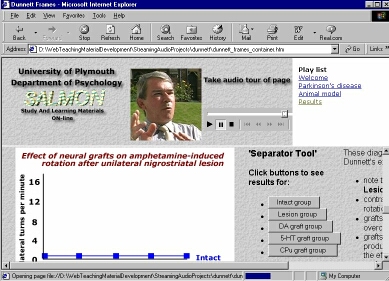
Example of streamed audio
Launch this web page in order to see how streamed audio can be used to provide an audio commentary to a web page
| Action | Screen display |
|
Explore how the start
|
 |
| See how links on a web page can also be used to trigger a sound commentary |  |
Copyright Dr Paul Kenyon, University of Plymouth (2001)
Last modified Friday, May 25, 2001
 and stop
  icons control the audio commentary