
"The use of sound to enhance web-based lecture support materials"
Led by Dr Paul Kenyon, University of Plymouth
|
|
LTSN workshops
on the preparation of web-based lecture support materials
"The use of sound to enhance web-based lecture support materials" Led by Dr Paul Kenyon, University of Plymouth |
In this section of the workshop you will:
| Action | Screen display |
|
|
| Action | Screen display |
|

|
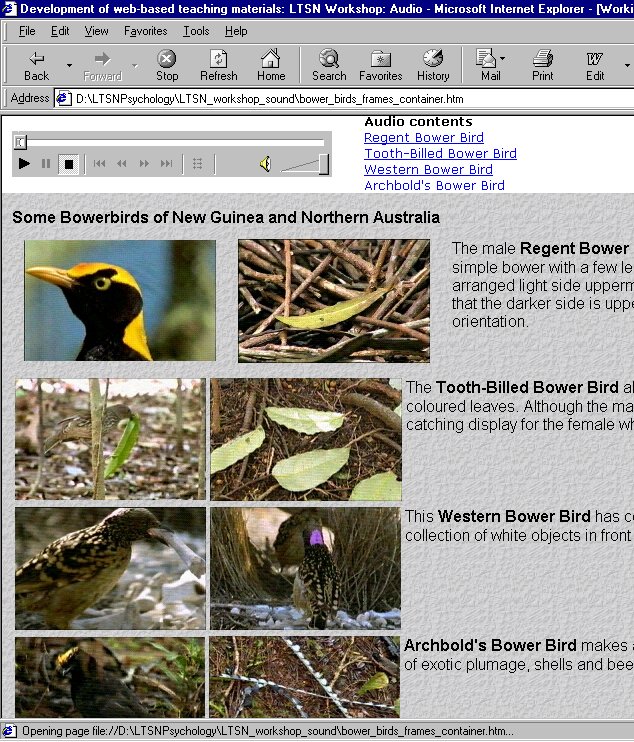
Four separate files are required to create this web page
| Action |
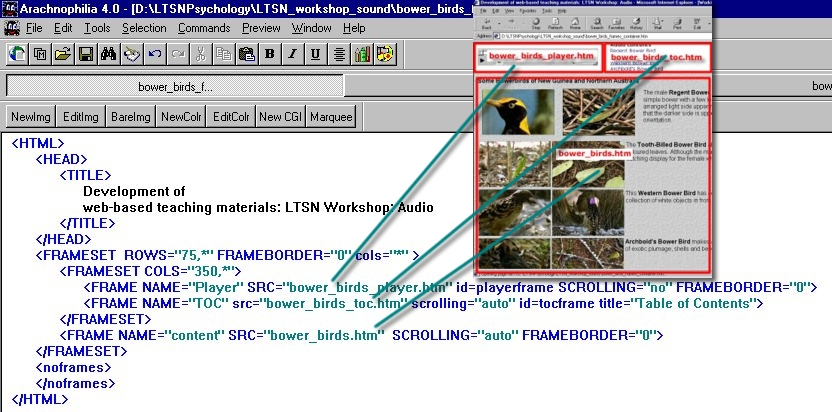
Open the first of these files bower_birds_container.htm in the text-based HTML editor Arachnophilia. The HTML code sets up three FRAMES that will display the contents of these three files:
|
|
Screen display |
|
| Action |
Open the file bower_birds.htm in Arachnophilia. Locate the <a name ...></a> tags which identify the position on the web page which displays information about each type of bower bird. |
||
| Screen display |

|
||
|
The name tag is normally used to write HTML code that enables users to move around a web page. For example, we could write HTML code such as
which would display in a browser as:
If the user clicked on the blue underlined text they would be shown the area of the page identified with the underlying HTML tag <a name="regent_bower_bird"</a> The name tag is used by markers in the ASF streaming audio file (bower_birds.asf) to display different parts of the web page as the audio commentary unfolds. |
| Action |
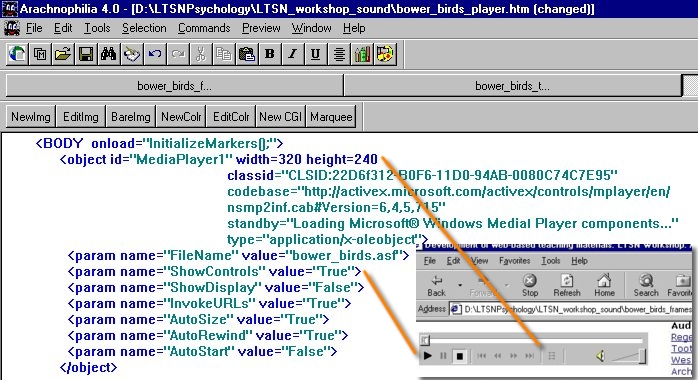
Open the file bower_birds_player.htm in Arachnophilia. Scroll to the bottom of the file to reveal the HTML code which loads the Windows Media Player into a web page and gives it the name "Media player1" |
| Screen display |
|
|
Parameters passed to Media Player control its appearance and behaviour. For example:
The code:
is supplied by Microsoft, and will automatically connect to their web site if the browser detects that the user has not installed Windows Media player. The user is then prompted to download the appropriate browser plugin. |
| Action |
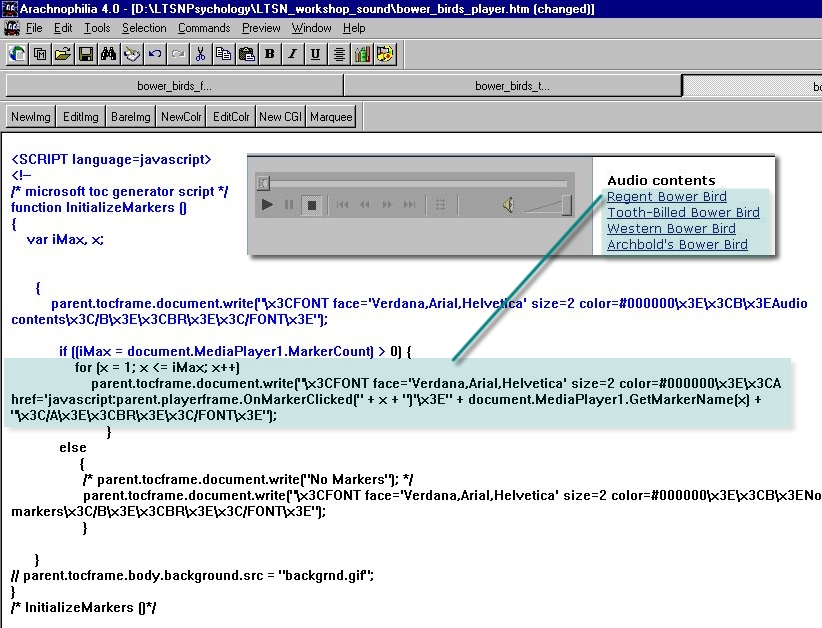
If necessary, open the file bower_birds_player.htm in Arachnophilia. Scroll to the middle of the file to reveal the function InitializeMarkers (). This code is modified from code contained within the Microsoft Windows Media Software Development Kit (SDK) |
||
| Screen display |
|
||
|
The function InitializeMarkers () checks the ASF file (bower_birds.asf) loaded into MediaPlayer1 for any embedded markers. If embedded markers are found the line:
|
| Action |
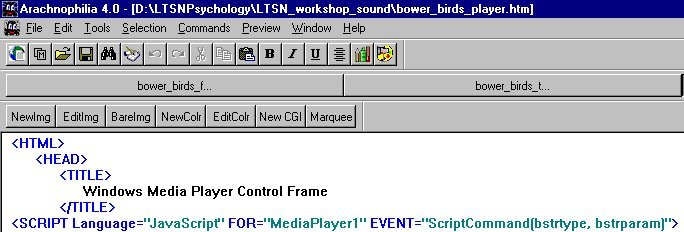
If necessary, open the file bower_birds_player.htm in Arachnophilia. Scroll to the top of the file to reveal the JavaScript which deals with script commands inserted into the ASF file (bower_birds.asf) by theWindows Media ASF indexer tool |
| Screen display |
|
|
the line:
'listens' to the ASF file as it plays. Several Script Commands have been embedded into the ASF file. Each Script Command passes two parameters (bstrtype, bstrparam) to the MediaPlayer1 event handler . Next we will examine the values of these parameters stored in bower_birds.asf |
| Action | Screen display | |||||||||||||||
|
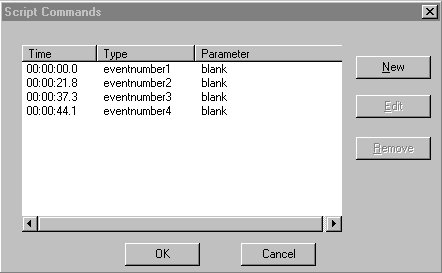
Open bower_birds.asf in Windows Media ASF Indexer. Hit the Edit Script Commands button At time 00:00:00.0 bower_birds.asf passes the parameters
MediaPlayer1 event handler which stores them as
The actual values may differ in your version of bower_birds.asf |
|
| Action |
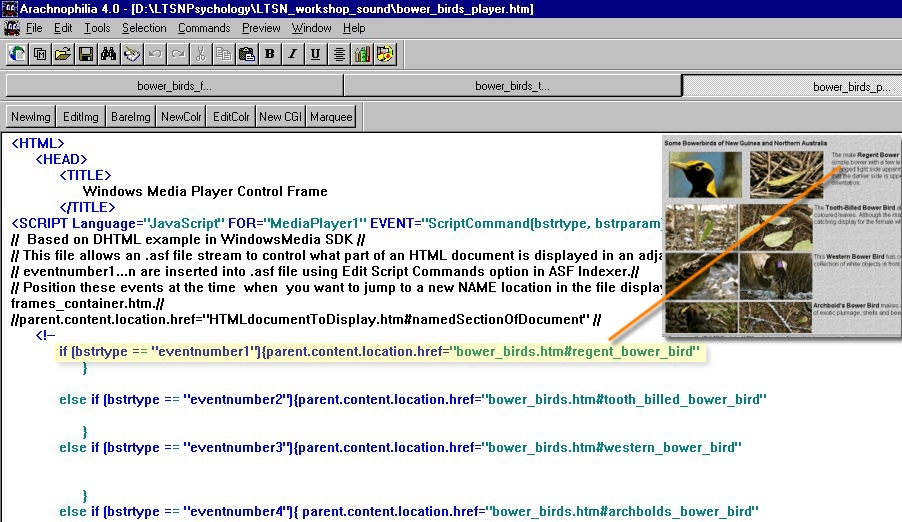
If necessary, open the file bower_birds_player.htm in Arachnophilia. Locate the line:
This line executes if the MediaPlayer1 event handler receives the the Script Command eventnumber1 in the stream of information from the ASF file bower_birds.asf |
| Screen display |
|
|
The line
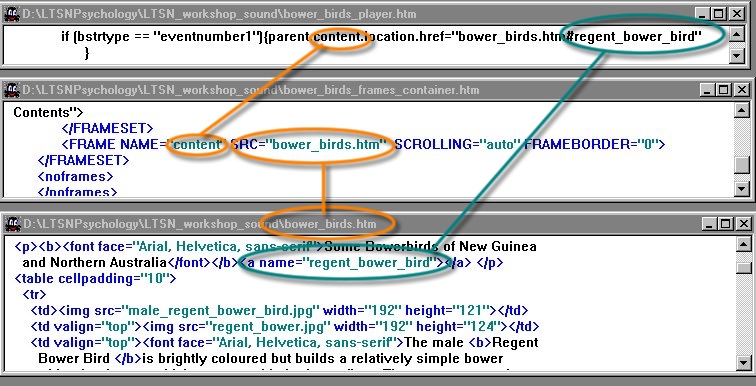
displays bower_birds.htm#regent_bower_bird in the frame named 'content'
The 'content' frame name was defined in the HTML file: bower_birds_frame_container.htm
The location 'regent_bower_bird' was defined in the HTML file: bower_birds.htm
These interrelationships are shown in the composite picture below |
|
| Action |
If necessary, open the file bower_birds_player.htm in Arachnophilia. Work out what effect the Script Commands:eventnumber2, eventnumber3 and eventnumber4 will have on the information displayed in the frame named 'content' |
| Screen display |

|
Copyright Dr Paul Kenyon, University of Plymouth (2001)
Last modified Friday, May 25, 2001
